iPhone steps,
on your own dashboard
I have a small self-hosted dashboard — weather, sleep data from an Oura ring, a couple of cron jobs. One day I asked Claude to put my daily step count on it too. The catch: steps live in Apple Health, and Apple Health has no cloud API. No endpoint, no token, nothing to curl. The data is end-to-end encrypted and never leaves my devices in any form a server could ask for. The fix turned out to be a three-action Shortcuts automation and about thirty lines of PHP. We split the work along the obvious line: I took the phone, Claude took the server.
The one-sentence version
If the server can't pull health data, the phone has to push it — and Shortcuts is the only first-party tool allowed to do that.
Every night my phone sums today's steps, builds a URL, and fires one HTTP request at my dashboard. The dashboard writes it into SQLite. That's the whole pipeline.
Why there's no easier way
We went through the obvious alternatives first. None of them work, or they cost money:
| Idea | Why it doesn't work (for this) |
|---|---|
| Some HealthKit web API | Doesn't exist. HealthKit is on-device only; iCloud sync is end-to-end encrypted. |
| Read it off my Mac over SSH | There's no Health app on macOS — no database to read. SSH access to a Mac gets you nothing. |
| Health's export.zip | Works, but it's a manual, hundreds-of-MB XML dump. Great for backfilling history, useless as a daily feed. |
| Health Auto Export app | Solid choice, REST export — but it's a paid third-party app for something Shortcuts does natively. |
| Shortcuts automation | Free, first-party, runs on a schedule, and HealthKit trusts it. Winner. |
The receiving end: ~30 lines of PHP
This half was Claude's. My dashboard is a single index.php with SQLite — no framework, no build step. Claude wrote the ingest endpoint as a block at the top of the file: check a secret key, validate the params, upsert one row.
// GET /?ingest=steps&key=...&steps=12345[&date=YYYY-MM-DD]
if (($_GET['ingest'] ?? '') === 'steps') {
    $key = trim(file_get_contents(DATA_DIR . '/ingest.key'));
    if (!hash_equals($key, (string)($_GET['key'] ?? ''))) {
        http_response_code(403);
        exit(json_encode(['error' => 'bad key']));
    }
    $steps = (int)($_GET['steps'] ?? 0);
    $date  = $_GET['date'] ?? date('Y-m-d');   // server fills today
    if ($steps <= 0 || !preg_match('/^\d{4}-\d{2}-\d{2}$/', $date)) {
        http_response_code(400);
        exit(json_encode(['error' => 'need steps>0 and date=YYYY-MM-DD']));
    }
    $db = new SQLite3(DATA_DIR . '/health.db');
    $db->exec('CREATE TABLE IF NOT EXISTS steps
               (date TEXT PRIMARY KEY, steps INTEGER, updated_at TEXT)');
    $stmt = $db->prepare('INSERT INTO steps VALUES (:d, :s, :u)
        ON CONFLICT(date) DO UPDATE SET steps = :s, updated_at = :u');
    // bind, execute, echo {"ok":true} …
}
Two design choices worth copying. First, the date is optional — if the phone doesn't send one, the server stamps the row with its own "today." More on why below. Second, same-day rows upsert — running the shortcut five times a day just overwrites today's count with a fresher number. No duplicates, no cleanup.
One more layer: the dashboard isn't on the public internet at all. It's served over Tailscale (tailscale serve on the host), so only my own devices can reach it. The secret key is just the second lock on an already-private door.
The Shortcut: three actions
This half was mine. Claude can write the server side, but it cannot tap my iPhone screen — yet. So I built the phone side myself: three actions in the Shortcuts app, plus a personal automation that runs them on a schedule:
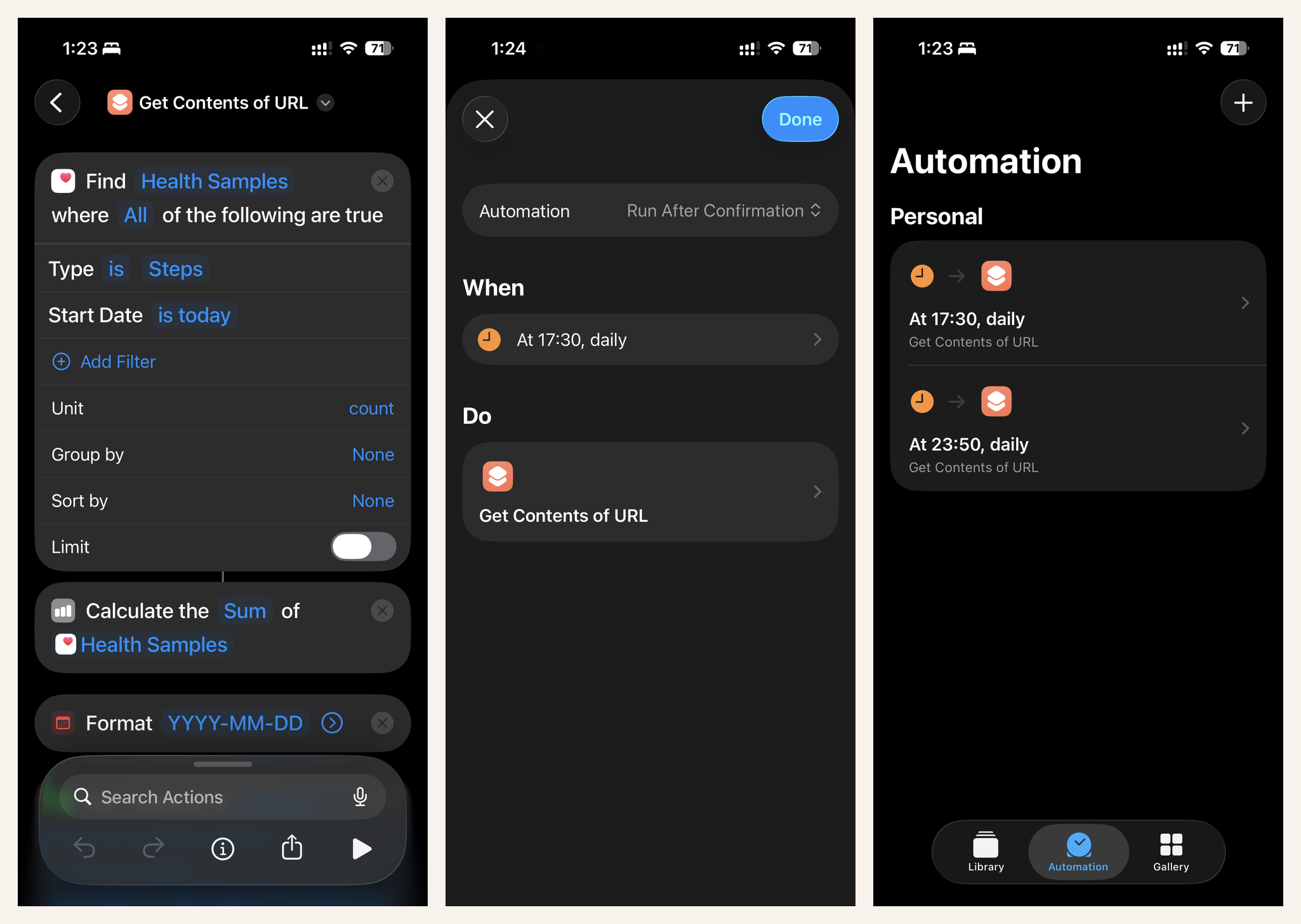
- Find Health Samples — Type is Steps, Start Date is today. Returns every step sample the phone and watch recorded today.
- Calculate Statistics — Sum of Health Samples. One number out.
- Get Contents of URL — a plain GET with the sum dropped in as a variable:
https://<your-host>/?ingest=steps&key=<secret>&steps=⟨Sum⟩
The first run asks for Health permission (allow Steps, read-only) and that's it. The server answers {"ok":true,"date":"2026-06-12","steps":9841}.
Two gotchas that actually bit us
The bracket trap
Written instructions tend to show URLs as steps=[Sum] — and it's very easy to type the brackets literally around the variable chip. The server then receives steps=[9841], which casts to zero, and rejects it. The brackets are placeholders. The blue chip is the variable.
The empty date
The first version of the shortcut sent a date= param built with a Format Date action — which silently produced an empty string, because it was fed the sum instead of a date. The fix was to delete the action entirely and let the server default to its own today. Fewer actions, fewer ways to be wrong.
Debugging tip: Claude made the endpoint echo back what it received whenever a request fails validation — {"error":"…","received":{"steps":"73","date":""}} pinpointed the empty date in one run, right on my phone, no server logs needed.
Making it run itself
Shortcuts → Automation → Time of Day, daily, pick the shortcut, and — the important part — set it to Run Immediately, otherwise the phone asks me for confirmation every night and nothing is automatic about that. Because same-day pushes upsert, I run it twice: once at 17:30 (so the dashboard isn't a day stale all evening) and once at 23:50 for the final count.
What makes it tick
- +Tailscale stays connected on the phone — the dashboard is tailnet-only, so no VPN, no delivery
- +Run Immediately, no confirmation prompt
- +Upserts make reruns and double-schedules free
Failure mode
- −Phone off / VPN off at trigger time → that day's row is simply missing
- −No retries, no queue — it's a fire-and-forget GET
- −Good enough for a step chart; don't run your pacemaker on it
For history, the same endpoint takes an explicit date param — so a one-off backfill shortcut (Find Health Samples grouped by day, looped over Repeat with Each) or a parse of Health's export.zip can pour months of old data into the same table.